Database Management System (DBMS) | Types, Role, Architecture, Characteristics, Advantages & Disadvantages

What is Database Management System (DBMS) ? Meaning of Database Management System Data is one of the most important business assets. It is only useful when it is suitably managed. When data is properly managed, it transforms into information which can be utilized in making business decisions. Organisations can only survive when it takes optimized … Read more

Data Mining | Definition, Techniques, Types, Strategy, Advantages & Disadvantages

What is Data Mining ? Meaning of Data Mining Data mining is the process of discovering meaningful patterns, trends, and insights from large volumes of data to inform decision-making and extract valuable knowledge. The activity of analyzing various data from different aspects and presenting it into meaningful information which can be utilized to promote sales and … Read more

Executive Information System | Definition, Characteristics, Advantages & Disadvantages

What is Executive Information System/Executive Support System ? An information system designed to cater the specific needs of executives is known as Executive Information System (EIS). It is also known Executive Support System (ESS). EIS is commonly considered as a specific form of Decision Support Systems (DSS) as it helps in the information gathering and … Read more

Group Decision Support System (GDSS) | Features, Components, Advantages & Disadvantages

DECISION SUPPORT

GROUP DECISION SUPPORT SYSTEM (GDSS)

 
Contents :
  1. Introduction of Group Decision Support System.
  2. Advantages of Group Decision Support System.
  3. Disadvantages of Group Decision Support System.
  4. Features of Group Decision Support System (GDSS).
  5. Components of Group Decision Support System (GDSS).


What is GDSS ?


GDSS is the abbreviation for Group Decision Support System. It is a system that supports decision-making and has been designed and structured in such a way so that the members constituting a group can interact with each other to arrive at a particular decision. It provides support for various group decision-making activities such as file sharing, integration of the individual opinions with that of the group, communication, modelling of group actions and any other action which requires interaction of the group members.

The decision support systems that have been mentioned till now facilitate a single person to take decisions by providing computerised support. These decisions fall into the unstructured or semi-structured category. Most of the decisions that have to be taken in the organisation are generally a group effort rather than taken by a single person.

The main characteristic of the Group Decision Support Systems or GDSS is to support exchange and flow of information and ideas seamlessly between various members of the decision-making group. It also maintains the privacy of the members. There are also many other terms that have been introduced for the use of information technology in decision-making within a group. Some of the popular terms that are in use include Group Support System (GSS), Computer-Supported Co-operative Work (CSCW), computerised collaborative work support and Electronic Meeting System (EMS). Groupware is the term that has been coined for software used in such a scenario. 
Thus, a computer-based system is interactive in  nature and helps in solving problems that are unstructured in nature when a group of decision makers are working in collaboration with each other.

What is Software? | Types, System & Application Software

Software


Contents :

  • Concept of Software.
  • Relationship Between Hardware and Software and its Features.
  • Types of Software.
  • Types of System Software.
  • Types of Translators are Available Presently.
  • Types of Application Software.
  • Difference between System Software & Application Software.


What is Software ?


Software is the planned sequential instructions which required for processing the input data and transform it into information. So, it makes the working of the computer meaningful.
A Program is a set of instructions that performs a specific task. Such program as single or in a group is termed as software. These instructions help the computer to process the input data and produce the desired output results.
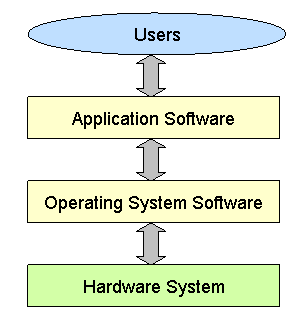
Hardware and software together make a computer system complete. Either of them singularly, is of no use. It is the software which makes the computer alive or usable. Both software and hardware helps the computer to perform functions like storage, retrieval and solving different types of problems.

Relationship between Hardware and Software :


Hardware and Software are two vital components of a computer system which make it a complete system. Each without the other is incomplete and cannot survive on its own. The computer without software is just a metal box. One can store, retrieve and solve different types of problems only by using the software. A user friendly environment is created with the help of the software for software development. The set of instructions, present in the software, develop the arithmetic and logical capabilities of the hardware units of the system to achieve optimal performance.
In order to achieve optimum output, hardware and software should always work collectively. Each on its own has no value as they are dependent on each
other.
For example, a cassette player and the cassettes available in the market are hardware and the songs recorded in the cassette are the software. In order to listen to a song, it requires recording in the cassette first and then it is to be mounted in a cassette player to be played. Likewise, in order to get a work done on computer, the software has to be loaded onto the hardware and then implemented.

The above Example brings about the Following Features of the Relationship Between Hardware and Software :


  • Both hardware and software are required for completion of a computer system job as they  complement each other.
  • The same hardware can store different software for performing different types of jobs just like various songs can be recorded and played on a single cassette player.
  • Hardware is a one-time expenditure except for upgrades like increasing main memory and hard disk capacities or adding speakers, modems, etc. On the other hand, software is a continual expenditure.


Hardware | Component of CPU, Types of Input & Output Device

hardware

Contents :

  1. Overview of Hardware.
  2. Components of Central Processing Unit (CPU).
  3. Types of Input Devices.
  4. Types of Output Devices.
  5. Computer hardware components

What is Hardware ?


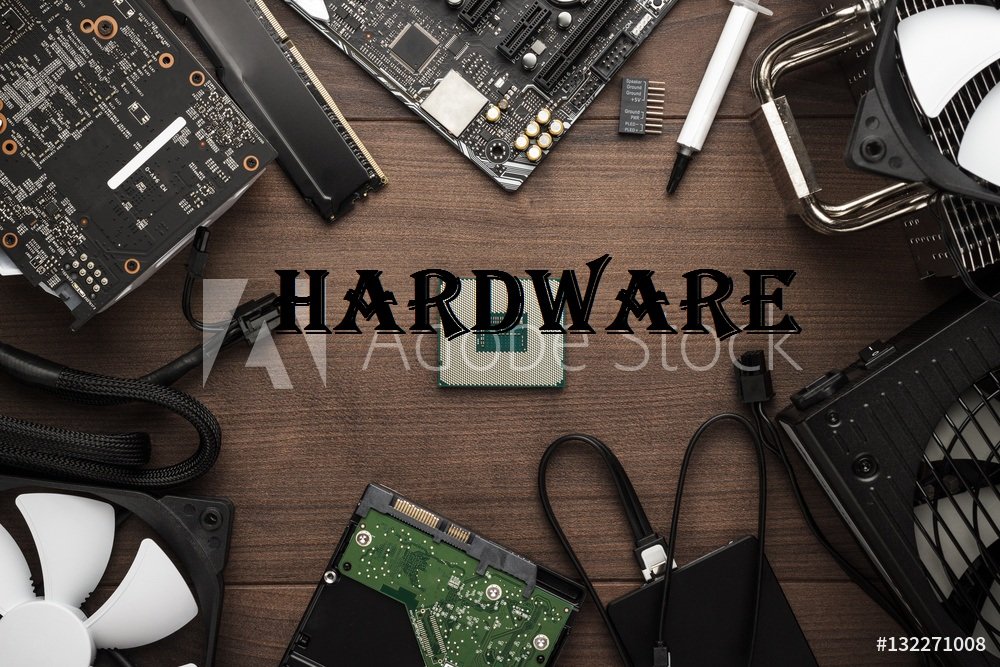
Hardware of computer are those components that are physical in nature, i.e. they are tangible or can be physically touched. We know that a computer is used for various operations like complex mathematical calculations, storing, merging, retrieving information in a fast way but all these operations cannot be possible without hardware. The hardware can be installed inside and can even be attached to outside of a computer. Hardware components have several hardware devices or physical elements.

The various types of hardware connected to computers are as follows :
  1. Central Processing Unit.
  2. Memory.
  3. Input Devices.
  4. Output Devices.
  5. Communication or Network Devices.

Central Processing Unit (CPU) :


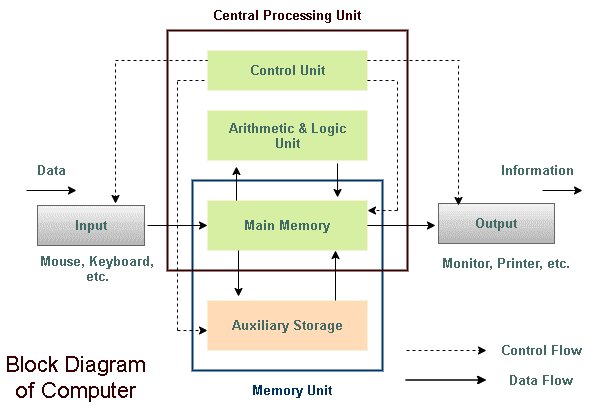
The ‘brain’ of any computer system is the CPU or the processor which has a built-in set of instructions to be implemented. These instructions define the capacity of the computer.
The CPU determines the overall performance of a computer. It calculates and compares as well as activates and controls the operations of all other units of a computer system.

Components of CPU :

1) Arithmetic Logic Unit (ALU) :
The circuitry which carries out all arithmetic and logical calculations are contained in the Arithmetic unit.

i) Arithmetic Unit : 
It performs all arithmetic operations like addition, subtraction, multiplication and division and also logical operations such as less than (<), equal to (=) and greater than (>) at very high speed. It is to be noted that arithmetic calculations are limited to additions only like multiplication is repeated addition, e.g, 2 x 3 is 2+2+2, i.e., 6. Similarly, for subtraction, adding the negative of the second number performs subtraction, e.g. x – y is same as x + (-y).
Also, division can be done by multiplying the inverse of a number, e.g., x/y. is same as xx I/y. This is the reason why most processors only have the add function.

ii) Logic Unit : 
The Logic Unit helps the CPU in making logical decisions on the basis of instructions received. This is done by the process of logically comparing two data items and taking action accordingly based on the comparison results. In the development of computers, creation of machines that could make decisions was a defining moment, as it transformed the machine from being Just a calculator to one that can perform various tasks.

2) Control Unit (CU) : 
The main task of the control unit is to transfer the data and instructions between the different parts of a computer. The control system converts every instruction to a series of control signals which assist in the operation of other parts of the computer.
The control unit is the heart of the CPU which controls the I/O devices and data transfer to and from the primary storage.
The individual instructions of programs stored in the primary storage controls the control unit. The instruction register is used for holding the current instruction and an instruction pointer is used.to hold address of the subsequent instruction. Every instruction is decoded and then implemented correctly which is ensured by the CPU. A parallel can be drawn between the working of the CPU and the traffic police. The control unit decides which action will take place next just like the traffic police which plans according to which road traffic will move or step along with their duration.
The control unit decides what data is required, where it is to be stored, where the results of the operation is to be stored and also send control signals to devices used in the implementation of the instructions. Thus, it monitors the movement of data and instructions in a proper sequence by the use of clock inputs.

3) Registers : 
Registers are used to increase the speed of computing process. It is a special type of memory and manages all the processes satisfactory. Registers are the interval memory (inside the microprocessor), which get the information from the Random Access Memory (RAM) and perform the interval calculation and operation for the microprocessor.

4) Buses :
Buses are used to connect more than two devices. So it acts as a pathway and is able to connect the multiple devices. It is a shared transmission medium. For the CPU, bus act as an information highway.

Input Devices :


Input devices are those devices that are used to feed the data into computer. Currently in market, several types of input devices are present due to the advancement in computer technologies.

Business Intelligence | Framework, Applications, Advantages & Disadvantages

Contents : Concept and Various Technologies of Business Intelligence. Framework and Elements of Business Intelligence. Working of Business Intelligence. Advantages & Disadvantages of Business Intelligence. Applications of Business Intelligence. What is Business Intelligence ? The combination of different types of systems and tools which are vital for strategic planning process of an organization is known as Business … Read more

Data Modeling | Definition, Examples, Types, Tools, Process & Advantages

✏ Table of Content : Data Modeling Concept Definition of Data Modeling Data Modeling Examples Types of Data Modeling Data Modeling Tools Data Modeling Process Advantages of Data Modeling Disadvantages of Data Modeling What is Data Modeling ? Data modeling is a crucial process in the field of information technology that involves creating a conceptual representation … Read more

Cyber Security | Definition, Types, Stages, Tools, Examples & Advantages

✏ Table of Content : Cyber Security Meaning Cyber Security Definition Objectives of Cyber Security Types of Cyber Security Stages of Cyber Security Cyber Security Tools Cyber Security Examples Steps in Cyber Security Advantages of Cyber Security Disadvantages of Cyber Security What is Cyber Security ? Cybersecurity is the practices, technologies, and processes designed to … Read more

Endpoint Detection and Response | Example, Tools, Benefits & Limitations

What is Endpoint Detection and Response ? Endpoint Detection and Response (EDR) is a vital component of modern cybersecurity strategies, focusing on protecting endpoints such as laptops, desktops, servers, and mobile devices from advanced threats. It operates by continuously monitoring endpoint activities, collecting data in real-time, and analyzing it to detect and respond to suspicious … Read more